
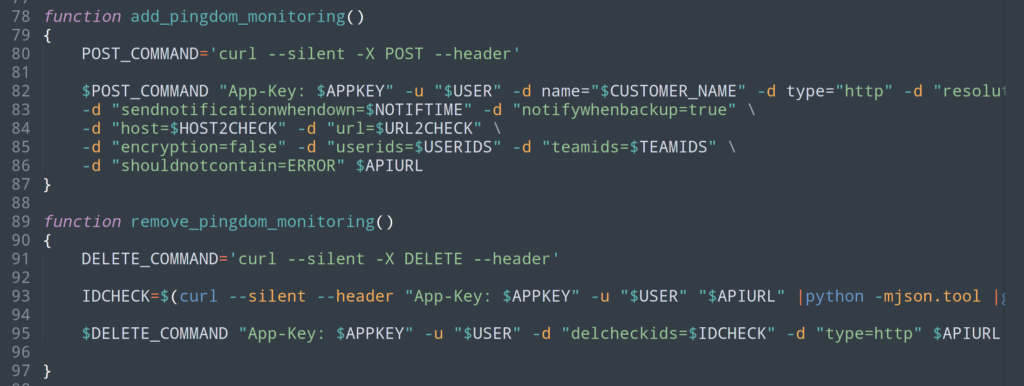
Hi friends, following the live coding session where I showed you how I wrote SMS (StackX Monitoring System): a monitoring script in bash with an embeddable HTML output , I have just written a companion script (SPP for StackX Pingdom Provisionner), still in bash, which automatically creates a check that verifies the content of the monitoring page: if an ERROR status is returned, then it generates an alert.
When the service is available again, it will send an UP notification. Finally the script can also delete the corresponding Pingdom configuration.
For those who want to see the live coding:
A few more details: the following function lets me switch configurations according to the template or configuration I want to use.
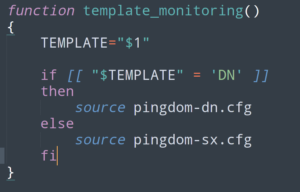
So do not forget to either fill in the corresponding file with your own information, or simply to replace it with the name of your own file. You can of course also remove this mechanism entirely if you do not need it.
Here is also an example of how to use it:
Adding a check for http://brain.stackx.run/Brain0verridebrain.php:
./pad_pingdom.stackx.sh -n "Brain 0verride" -h brain.stackx.run -u /Brain0verridebrain.php -t SX -a add
Deleting that check:
./pad_pingdom.stackx.sh -n "Brain 0verride" -h brain.stackx.run -u /Brain0verridebrain.php -t SX -a remove
or more simply:
./pad_pingdom.stackx.sh -h brain.stackx.run -t SX -a remove
Note: while I was doing this live coding I could not see a thing. So why does the delete line work anyway despite 2 errors?
Well, simply because the variables URL2CHECK and HOST2CHECK are not used when deleting: only the ID matters. At that moment, the documentation was just “a big bright blur”, as Han Solo might have said ;).
So, the version here is corrected, a simple: $DELETE_COMMAND "App-Key: $APPKEY" -u "$USER" -d "delcheckids=$IDCHECK" -d "type=http" $APIURL does the job perfectly :)
Finally, feel free to consult the Pingdom API documentation here: https://www.pingdom.com/api/2.1/
You can download the script via the following link: StackX Pingdom Provisionner
—
Christophe Casalegno
You can follow me on: Twitter | Facebook | Linkedin | Telegram | Youtube
Leave a comment
Add a comment