
Hi everyone, so many of you (more than 150!) have asked whether the bash shell script for Linux that I presented during my latest live coding, entitled « Live coding: a complete server monitoring script in BASH under Linux », could be made available online. For those who want to watch or rewatch the video, it is available below.
A few explanations I gave during my latest general livestream: be aware that there are a few differences between the scripts I show you in my live coding and their « final » version. Why? Simply because I show you the “skeleton”: the shared, working foundation you can use as a guide to create your own tools afterwards.
For my part, since these scripts generally serve specific purposes, I then adapt them to my own needs. So although you will find what I showed in the live coding session, it will generally always be a more elaborate version tailored to my needs. This script is no exception. It will also be updated regularly.
So to download it, you just need to use the following link: sms.sh . I am also putting a few more details about how the script works further down.
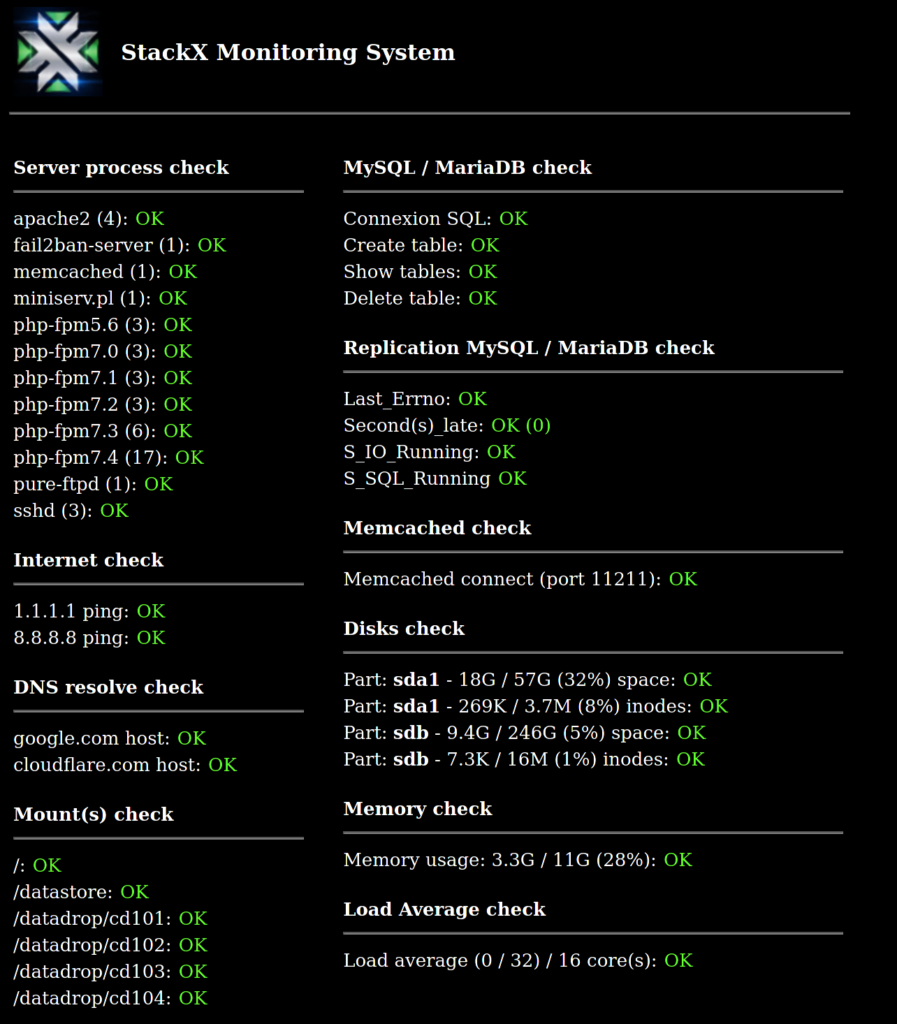
In practice, here is what the generated page looks like:
First of all, I placed the script under the GPL 3.0 license. Next, you should know that this script was originally designed to complement a much larger application, a sort of big “stack deployer” I use for client deployments. So some elements that the script uses are normally generated automatically by the deployer. I added as much information as possible in the comments at the start of the file, but I will go over the main points here.
1) This script produces HTML output and is designed to be embedded in a dynamic web language such as php, python, etc. Here is an example of integrating it with PHP:
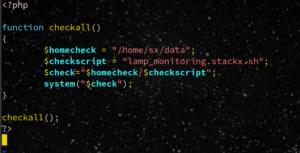
Remember not to put your script (and especially your credentials file) in a directory that your web server cannot list.
2) The logo that normally displays in the script is available here: ScalarX.jpg. So you just need either to replace the file name in the script, or to put a file of the same name in its place to put your own logo there for example, or to download the file and put it in the same root directory as your PHP, Python or other script to keep its original format.
3) I do not use this script “directly”: in my case, I make an API call to pingdom (or on any monitoring platform that allows it), to add a check with various details, including the page URL (generated using an algorithm specific to the deployer), which checks whether the page contains the word “ERROR”. If that is the case, an alert containing the link is sent (I receive it through various channels, such as Telegram, email or SMS). One click gives me a list of everything wrong, even before I connect to the server, or at least everything I want to see at first glance.
4) The file process2monitor.txt contains the list of all the processes to monitor. Again, in my case, this file is generated automatically per server. Here is an example of what the file contains in the example from the video:
apache2

fail2ban-server

memcached

miniserv.pl

php-fpm5.6

php-fpm7.0

php-fpm7.1

php-fpm7.2

php-fpm7.3

php-fpm7.4

php-fpm8.0

pure-ftpd

sshd
Note: the number in parentheses beside each process in the monitoring display indicates the number of processes running for each.
5) The file fs_list.txt contains all the mount points that should be present on the machine. Unlike the disk check that you will find in the code and that checks the space and number of inodes available on each partition, fs_list.txt is generated when the machine is installed (and updated when changes are made). It tells you whether an expected mount point is actually mounted on the system. The space and inode check, by contrast, is entirely dynamic and automatically applies to all file systems.
Again, I generate this automatically during server deployment, via commands such as:
grep -v '#' /etc/fstab |awk '{print $2}' > fs_list.txt or even grep 'sshfs' /etc/fstab |awk '{print $2}' >> fs_list.txt for the sshfs filesystems for example, etc. So you have to adapt it to your needs.
Example of the content of the file fs_list.txt:
/

/datastore

/datadrop/cd101
6) A configuration file is used. It is declared at the beginning of the script in this way:
CONF_FILE="/home/sx/.sx" # Replace by your config file
Example of content for the entries that interest you:
loginsxmysql:sx

passsxmysql:prxotpoofas
The user must have permission to perform the necessary operations on a single designated database only. If you need to use the MySQL replication check (which I do not show in the video but added afterwards), the user will also need permission to check replication.
7) Function options
At the end of the file you will find the list of function calls that generate the entire page:
startpage "StackX Local monitoring"

title "StackX Monitoring System"

table_init

titlecheck "Server process"

all_process_check

internet_check 1.1.1.1 8.8.8.8

dns_check google.com cloudflare.com

fs_check

center_column

mysql_check $LOGINSXMYSQL $PASSSXMYSQL 0

memcached_check 127.0.0.1 11211

disk_check 95 90 95 90

mem_check 95 90

load_check

table_end

endpage
internet_check: takes as many arguments as you want (I use these two IPs to see whether internet connectivity generally seems OK, but you can add or remove addresses).
dns_check: also supports as many sites as you want (watch the request times if you add a lot of them: they will increase the time needed to generate the page accordingly)
fs_check: if you want this check to be active (see point 5 above), you also have to add the parameter yes, which gives fs_check yes
mysql_check: if the 3rd parameter is passed as 1 instead of 0 it adds the MySQL replication checks (so use this only on replicated servers).
disk_check : you can change the thresholds through the parameters: error and warning levels for space and inode counts. By default it is set to 95% for ERROR and 90% for the warning level.
memcached_check: you can specify the ip address and the port. By default it is set to localhost and the default port 11211. If you have 4 different memcached instances you can repeat the check as many times as necessary: it works equally well locally and for checking remote servers.
mem_check: also supports 2 levels: ERROR and WARNING. As for disk_check you can set the thresholds in the parameters of the function, which are again set to 95% and 90%
load_check: does not use dynamic parameters, but you can change the method in the code if needed. Currently the alert threshold is set at twice the number of cores/threads available on the machine (it is therefore a dynamic value). Next, there is also a variable WAIT_B4_CHECK: it indicates the wait in seconds between two checks. Again, watch the page generation time if you use it this way. What does this function do? It first measures the machine’s load, waits for the time specified in WAIT_B4_CHECK (1 second by default), then takes a second measurement.
If the measured load is below the threshold it returns OK. If the measured load is above the threshold but the load is decreasing, then it returns a WARNING. Finally if this load is above the threshold and continues to increase, it generates ERROR to trigger an alert.
If you are unsure which values to use, see my explanatory video on load average, available here:
Of course, you can easily add your own checks, banner grabbers, etc. I put an example in the comments at the beginning of the script as well.
Addendum: I have just added a small function, the livecoding is available here:
With that, enjoy !
—
Christophe Casalegno (Brain 0verride)
Leave a comment
Add a comment