

Christophe CasalegnoAutoimmune warrior, Entrepreneur & Bio/Hacker

brain@127.0.0.1:~$ cat post.html

StackX SSL: generating SSL / TLS Let's Encrypt certificates in bash on Linux

Hello everyone, in my last video, I shared a little bash live-coding session, in which I built a tool to generate SSL / TLS Let’s Encrypt certificates, after first running several checks, particularly on the DNS records.

It met an internal need, and so I took the opportunity to record that moment.

For those who want to watch the video, I am putting it just below. In the first part, I also explain some of the internal technical workings of the company, in the context of this product (StackX: a semi-autonomous, fully managed LAMP stack).

Watch the video on YouTube

Many of you wrote to ask whether I would release the script. I now have, with several improvements over the original, including:

– Checks that the expected arguments are passed to the script and are valid.
– Multi-IP support, with the option to mix IPv4 & IPv6.
– A bit of color.
– More useful, readable output that can be sent directly to the client if needed.
– Lots of comments in French so that you can easily understand and modify the script
– Release under the free software licence GPL 3.0
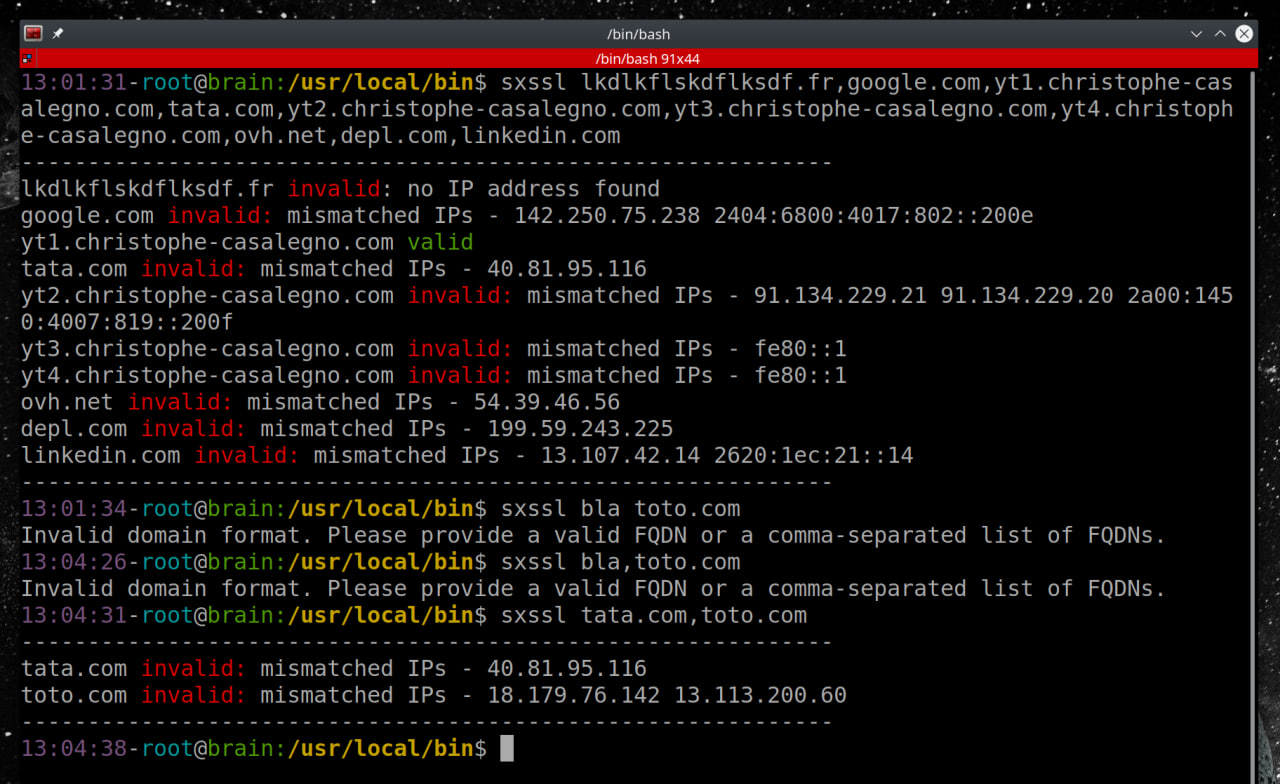
A little context:

I wrote this tool for an internal need involving specific configurations, so it may not suit your needs.

In particular, I use mod_alias to provide a fixed webroot for verification. Here is the configuration to put in /etc/apache2/mods-available/alias.conf if you want to use this feature:

Alias /.well-known "/home/letsencrypt/.well-known"
        <Directory "/home/letsencrypt">
                Options FollowSymlinks
                AllowOverride None
                Require all granted
        </Directory>

The script is available for download here: sxssl.sh or directly from the contributions page.

Enjoy, and have a good rest of the weekend!

You can follow me on: Telegram | YouTube | Twitter | Facebook | LinkedIn | Twitch

4 comments

  1. Chalut pitit scarabée,

    je t’écris ici parce que YT refuse (évidemment) mon commentaire sur ta dernière vidéo : « blacklister des ips et des réseaux sous linux » et parce que je bloque tellement de truc chez gogol que je n’ai même pas accès au bouton OK du captcha pour dévoiler ton adresse e-mail.

    Il y visiblement un problème dans ta RE IPv4 d’origine parce qu’elle autorise le blacklisting de l’adresse IP 255.255.255.255 , ce qui susceptible de provoquer un souci – de même, elle autorise des IP inexistantes, par exemple : 999.255.255.255

    Si le but est de permettre n’importe quelle adresse IP excepté : 0.0.0.0, x.x.x.0 et 255.255.255.255, soit : [ 1.0.0.1 – 255.255.255..254 ], alors la RE est différente :

    IP= »$1″
    REGEX=’^(([1-9]|[1-9][0-9]|1[0-9]{2}|2[0-4][0-9]|25[0-5])\.)(([0-9]|[1-9][0-9]|1[0-9]{2}|2[0-4][0-9]|25[0-5])\.){2}([1-9]|[1-9][0-9]|1[0-9]{2}|2[0-4][0-9]|25[0-4])$’

    if [[ « $IP » =~ $REGEX ]]
    then
    echo « Mon adresse IP : $IP qu’elle est bonne \o/ »
    else
    echo « NAN, veux pas, a pas bon ! »
    fi

    Pour ce qui est d’IPv6, j’ai une looongue string de test prenant tous les cas en compte qui traîne dans un fichier, mais comme je ne n’utilise pas IPv6… ça vient d’une discussion avec de très bonnes critiques sur la chose, donc ça doit faire le taf correctement :

    REGEX_IPv6='(([0-9a-fA-F]{1,4}:){7,7}[0-9a-fA-F]{1,4}|([0-9a-fA-F]{1,4}:){1,7}:|([0-9a-fA-F]{1,4}:){1,6}:[0-9a-fA-F]{1,4}|([0-9a-fA-F]{1,4}:){1,5}(:[0-9a-fA-F]{1,4}){1,2}|([0-9a-fA-F]{1,4}:){1,4}(:[0-9a-fA-F]{1,4}){1,3}|([0-9a-fA-F]{1,4}:){1,3}(:[0-9a-fA-F]{1,4}){1,4}|([0-9a-fA-F]{1,4}:){1,2}(:[0-9a-fA-F]{1,4}){1,5}|[0-9a-fA-F]{1,4}:((:[0-9a-fA-F]{1,4}){1,6})|:((:[0-9a-fA-F]{1,4}){1,7}|:)|fe80:(:[0-9a-fA-F]{0,4}){0,4}%[0-9a-zA-Z]{1,}|::(ffff(:0{1,4}){0,1}:){0,1}((25[0-5]|(2[0-4]|1{0,1}[0-9]){0,1}[0-9])\.){3,3}(25[0-5]|(2[0-4]|1{0,1}[0-9]){0,1}[0-9])|([0-9a-fA-F]{1,4}:){1,4}:((25[0-5]|(2[0-4]|1{0,1}[0-9]){0,1}[0-9])\.){3,3}(25[0-5]|(2[0-4]|1{0,1}[0-9]){0,1}[0-9]))’

    et ce que le type expliquait :

    # ‘(
    # ([0-9a-fA-F]{1,4}:){7,7}[0-9a-fA-F]{1,4}| # 1:2:3:4:5:6:7:8
    # ([0-9a-fA-F]{1,4}:){1,7}:| # 1:: 1:2:3:4:5:6:7::
    # ([0-9a-fA-F]{1,4}:){1,6}:[0-9a-fA-F]{1,4}| # 1::8 1:2:3:4:5:6::8 1:2:3:4:5:6::8
    # ([0-9a-fA-F]{1,4}:){1,5}(:[0-9a-fA-F]{1,4}){1,2}| # 1::7:8 1:2:3:4:5::7:8 1:2:3:4:5::8
    # ([0-9a-fA-F]{1,4}:){1,4}(:[0-9a-fA-F]{1,4}){1,3}| # 1::6:7:8 1:2:3:4::6:7:8 1:2:3:4::8
    # ([0-9a-fA-F]{1,4}:){1,3}(:[0-9a-fA-F]{1,4}){1,4}| # 1::5:6:7:8 1:2:3::5:6:7:8 1:2:3::8
    # ([0-9a-fA-F]{1,4}:){1,2}(:[0-9a-fA-F]{1,4}){1,5}| # 1::4:5:6:7:8 1:2::4:5:6:7:8 1:2::8
    # [0-9a-fA-F]{1,4}:((:[0-9a-fA-F]{1,4}){1,6})| # 1::3:4:5:6:7:8 1::3:4:5:6:7:8 1::8
    # :((:[0-9a-fA-F]{1,4}){1,7}|:)| # ::2:3:4:5:6:7:8 ::2:3:4:5:6:7:8 ::8 ::
    # fe80:(:[0-9a-fA-F]{0,4}){0,4}%[0-9a-zA-Z]{1,}| # fe80::7:8%eth0 fe80::7:8%1 (link-local IPv6 addresses with zone index)
    # ::(ffff(:0{1,4}){0,1}:){0,1}
    # ((25[0-5]|(2[0-4]|1{0,1}[0-9]){0,1}[0-9])\.){3,3}
    # (25[0-5]|(2[0-4]|1{0,1}[0-9]){0,1}[0-9])| # ::255.255.255.255 ::ffff:255.255.255.255 ::ffff:0:255.255.255.255 (IPv4-mapped IPv6 addresses and IPv4-translated addresses)
    # ([0-9a-fA-F]{1,4}:){1,4}:
    # ((25[0-5]|(2[0-4]|1{0,1}[0-9]){0,1}[0-9])\.){3,3}
    # (25[0-5]|(2[0-4]|1{0,1}[0-9]){0,1}[0-9]) # 2001:db8:3:4::192.0.2.33 64:ff9b::192.0.2.33 (IPv4-Embedded IPv6 Address)
    # )’

    Note que pour les fichiers blacklist et unblacklist tu pourrais également utiliser la syntaxe d’iptables-persistent dans chaque fichier.

    Voilà, my 2¢

    Jean-Yves

    1. Hello et merci, je regarderai ça, j’utilise plusieurs regex différents en fonction des scripts. J’ignore aussi lequel est le plus à jour, toutefois, je veux pouvoir continuer de bloquer 0.0.0.0 au besoin (on peut shutdown l’interface réseau, mais j’ai quelques cas particuliers ou ça m’arrive, même s’il est vrai que je peux toujours lancer iptables en manuel pour ça). Là, c’est une version pour les techs pas pour les clients, car il y a plein de moyens de contourner en utilisant une adresse réseau qui va elle-même contenir une ip à bloquer, il faut sinon s’assurer ensuite de réautoriser automatiquement les ips, etc.

      Pour mon adresse email : brain@christophe-casalegno.com
      Et sinon je suis facile à joindre via Telegram. Merci pour tout, je regarderai ça un peu plus tard.

      1. Je n’utilise pas la syntaxe, car ces fichiers servent souvent à autre chose rapidement avec des |xargs host |xargs whois, etc. C’est pour cela que je préfère les conserver « bruts ».

    2. Il doit y avoir une petite coquille dans la regex ipv6 :

      10:15:30-brain@mcp:~$ bash -xv ipv6.sh a.a.a.3
      #!/bin/bash

      REGEX_IPv6='(([0-9a-fA-F]{1,4}:){7,7}[0-9a-fA-F]{1,4}|([0-9a-fA-F]{1,4}:){1,7}:|([0-9a-fA-F]{1,4}:){1,6}:[0-9a-fA-F]{1,4}|([0-9a-fA-F]{1,4}:){1,5}(:[0-9a-fA-F]{1,4}){1,2}|([0-9a-fA-F]{1,4}:){1,4}(:[0-9a-fA-F]{1,4}){1,3}|([0-9a-fA-F]{1,4}:){1,3}(:[0-9a-fA-F]{1,4}){1,4}|([0-9a-fA-F]{1,4}:){1,2}(:[0-9a-fA-F]{1,4}){1,5}|[0-9a-fA-F]{1,4}:((:[0-9a-fA-F]{1,4}){1,6})|:((:[0-9a-fA-F]{1,4}){1,7}|:)|fe80:(:[0-9a-fA-F]{0,4}){0,4}%[0-9a-zA-Z]{1,}|::(ffff(:0{1,4}){0,1}:){0,1}((25[0-5]|(2[0-4]|1{0,1}[0-9]){0,1}[0-9])\.){3,3}(25[0-5]|(2[0-4]|1{0,1}[0-9]){0,1}[0-9])|([0-9a-fA-F]{1,4}:){1,4}:((25[0-5]|(2[0-4]|1{0,1}[0-9]){0,1}[0-9])\.){3,3}(25[0-5]|(2[0-4]|1{0,1}[0-9]){0,1}[0-9]))’
      + REGEX_IPv6='(([0-9a-fA-F]{1,4}:){7,7}[0-9a-fA-F]{1,4}|([0-9a-fA-F]{1,4}:){1,7}:|([0-9a-fA-F]{1,4}:){1,6}:[0-9a-fA-F]{1,4}|([0-9a-fA-F]{1,4}:){1,5}(:[0-9a-fA-F]{1,4}){1,2}|([0-9a-fA-F]{1,4}:){1,4}(:[0-9a-fA-F]{1,4}){1,3}|([0-9a-fA-F]{1,4}:){1,3}(:[0-9a-fA-F]{1,4}){1,4}|([0-9a-fA-F]{1,4}:){1,2}(:[0-9a-fA-F]{1,4}){1,5}|[0-9a-fA-F]{1,4}:((:[0-9a-fA-F]{1,4}){1,6})|:((:[0-9a-fA-F]{1,4}){1,7}|:)|fe80:(:[0-9a-fA-F]{0,4}){0,4}%[0-9a-zA-Z]{1,}|::(ffff(:0{1,4}){0,1}:){0,1}((25[0-5]|(2[0-4]|1{0,1}[0-9]){0,1}[0-9])\.){3,3}(25[0-5]|(2[0-4]|1{0,1}[0-9]){0,1}[0-9])|([0-9a-fA-F]{1,4}:){1,4}:((25[0-5]|(2[0-4]|1{0,1}[0-9]){0,1}[0-9])\.){3,3}(25[0-5]|(2[0-4]|1{0,1}[0-9]){0,1}[0-9]))’

      if [[ $1 =~ $REGEX_IPV6 ]]
      then
      echo « Mon adresse IP : $1 qu’elle est bonne »
      else
      echo « NAN, veux pas, a pas bon ! »
      fi
      + [[ a.a.a.3 =~  » ]]
      + echo ‘Mon adresse IP : a.a.a.3 qu’elle est bonne’
      Mon adresse IP : a.a.a.3 qu’elle est bonne

      10:15:39-brain@mcp:~$ host free.fr
      free.fr has address 212.27.48.10
      free.fr has IPv6 address 2a01:e0c:1::1
      free.fr mail is handled by 20 mx2.free.fr.
      free.fr mail is handled by 10 mx1.free.fr.
      10:16:27-brain@mcp:~$ bash -xv ipv6.sh 2a01:e0c:1::1
      #!/bin/bash

      REGEX_IPv6='(([0-9a-fA-F]{1,4}:){7,7}[0-9a-fA-F]{1,4}|([0-9a-fA-F]{1,4}:){1,7}:|([0-9a-fA-F]{1,4}:){1,6}:[0-9a-fA-F]{1,4}|([0-9a-fA-F]{1,4}:){1,5}(:[0-9a-fA-F]{1,4}){1,2}|([0-9a-fA-F]{1,4}:){1,4}(:[0-9a-fA-F]{1,4}){1,3}|([0-9a-fA-F]{1,4}:){1,3}(:[0-9a-fA-F]{1,4}){1,4}|([0-9a-fA-F]{1,4}:){1,2}(:[0-9a-fA-F]{1,4}){1,5}|[0-9a-fA-F]{1,4}:((:[0-9a-fA-F]{1,4}){1,6})|:((:[0-9a-fA-F]{1,4}){1,7}|:)|fe80:(:[0-9a-fA-F]{0,4}){0,4}%[0-9a-zA-Z]{1,}|::(ffff(:0{1,4}){0,1}:){0,1}((25[0-5]|(2[0-4]|1{0,1}[0-9]){0,1}[0-9])\.){3,3}(25[0-5]|(2[0-4]|1{0,1}[0-9]){0,1}[0-9])|([0-9a-fA-F]{1,4}:){1,4}:((25[0-5]|(2[0-4]|1{0,1}[0-9]){0,1}[0-9])\.){3,3}(25[0-5]|(2[0-4]|1{0,1}[0-9]){0,1}[0-9]))’
      + REGEX_IPv6='(([0-9a-fA-F]{1,4}:){7,7}[0-9a-fA-F]{1,4}|([0-9a-fA-F]{1,4}:){1,7}:|([0-9a-fA-F]{1,4}:){1,6}:[0-9a-fA-F]{1,4}|([0-9a-fA-F]{1,4}:){1,5}(:[0-9a-fA-F]{1,4}){1,2}|([0-9a-fA-F]{1,4}:){1,4}(:[0-9a-fA-F]{1,4}){1,3}|([0-9a-fA-F]{1,4}:){1,3}(:[0-9a-fA-F]{1,4}){1,4}|([0-9a-fA-F]{1,4}:){1,2}(:[0-9a-fA-F]{1,4}){1,5}|[0-9a-fA-F]{1,4}:((:[0-9a-fA-F]{1,4}){1,6})|:((:[0-9a-fA-F]{1,4}){1,7}|:)|fe80:(:[0-9a-fA-F]{0,4}){0,4}%[0-9a-zA-Z]{1,}|::(ffff(:0{1,4}){0,1}:){0,1}((25[0-5]|(2[0-4]|1{0,1}[0-9]){0,1}[0-9])\.){3,3}(25[0-5]|(2[0-4]|1{0,1}[0-9]){0,1}[0-9])|([0-9a-fA-F]{1,4}:){1,4}:((25[0-5]|(2[0-4]|1{0,1}[0-9]){0,1}[0-9])\.){3,3}(25[0-5]|(2[0-4]|1{0,1}[0-9]){0,1}[0-9]))’

      if [[ $1 =~ $REGEX_IPV6 ]]
      then
      echo « Mon adresse IP : $1 qu’elle est bonne »
      else
      echo « NAN, veux pas, a pas bon ! »
      fi
      + [[ 2a01:e0c:1::1 =~  » ]]
      + echo ‘Mon adresse IP : 2a01:e0c:1::1 qu’elle est bonne’
      Mon adresse IP : 2a01:e0c:1::1 qu’elle est bonne

Leave a comment

Add a comment
Christophe Casalegno Brain 0verride

Keep it simple
and direct!