
Hello everyone, in my last video, I shared a little bash live-coding session, in which I built a tool to generate SSL / TLS Let’s Encrypt certificates, after first running several checks, particularly on the DNS records.
It met an internal need, and so I took the opportunity to record that moment.
For those who want to watch the video, I am putting it just below. In the first part, I also explain some of the internal technical workings of the company, in the context of this product (StackX: a semi-autonomous, fully managed LAMP stack).
Many of you wrote to ask whether I would release the script. I now have, with several improvements over the original, including:
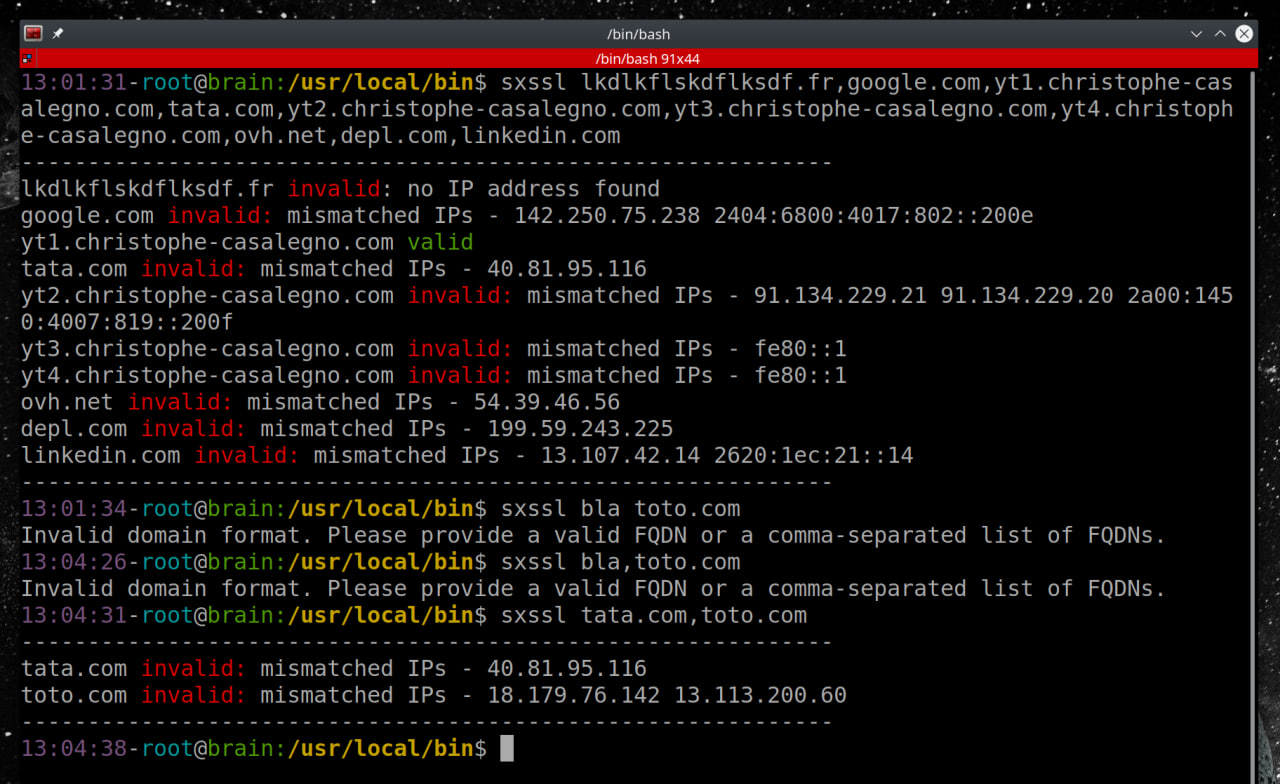
– Checks that the expected arguments are passed to the script and are valid.
– Multi-IP support, with the option to mix IPv4 & IPv6.
– A bit of color.
– More useful, readable output that can be sent directly to the client if needed.
– Lots of comments in French so that you can easily understand and modify the script
– Release under the free software licence GPL 3.0
A little context:
I wrote this tool for an internal need involving specific configurations, so it may not suit your needs.
In particular, I use mod_alias to provide a fixed webroot for verification. Here is the configuration to put in /etc/apache2/mods-available/alias.conf if you want to use this feature:
Alias /.well-known "/home/letsencrypt/.well-known"
        <Directory "/home/letsencrypt">
                Options FollowSymlinks
                AllowOverride None
                Require all granted
        </Directory>
The script is available for download here: sxssl.sh or directly from the contributions page.
Enjoy, and have a good rest of the weekend!
You can follow me on: Telegram | YouTube | Twitter | Facebook | LinkedIn | Twitch

4 comments