
SxSerialCheck: ScalarX Serial Check
SxSerialCheck is a GPL-licensed Bash script for checking a domain’s DNS synchronisation across its different name servers (NS).
It queries each server with dig, retrieves the SOA serial and identifies any discrepancies or errors.
Main features
– Checks DNS serial (SOA) consistency across NS servers.
– Detects inconsistencies, timeouts or invalid NS servers.
– Automatically retrieves the NS list if none is supplied.
– Intelligent serial formatting (optional date display).
– A --raw mode for automated processing in scripts or monitoring.
– Compatible with IPv4, IPv6 and FQDNs.
– Colour-coded status (synchronisation OK / errors).
Usage
Standard command:
sxserialcheck.sh domaine.tld
With manually specified NS servers:
sxserialcheck.sh domaine.tld ns1.example.com,ns2.example.com,ns3.example.com
In raw mode:
sxserialcheck.sh domaine.tld --raw
Note: the script can be copied to /usr/local/bin and renamed for use as a system command.
Options
Usage: sxserialcheck.sh <domaine> [ns1,ns2,...] [--raw]
– If no NS servers are specified, they will be retrieved automatically using dig NS.
– If serials use the YYYYMMDDnn format, the date will be displayed (unless --raw is used).
Examples
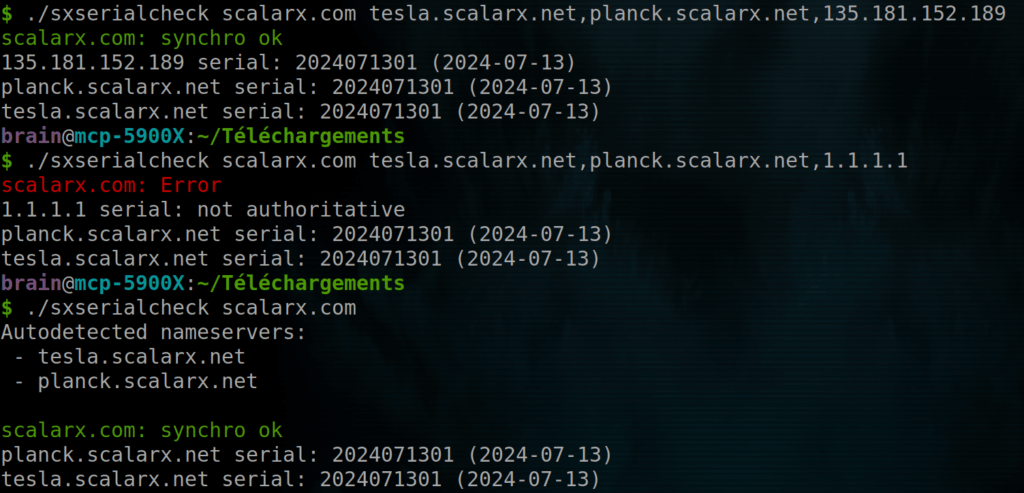
Todo list
– Add an --only-incoherent option to report only errors.
– Explicit support for custom ports (e.g. DNS over TCP on a non-standard port).
Resources
– Script: sxserialcheck.sh
—
Christophe Casalegno
You can follow me on: Telegram | Facebook | LinkedIn | X | YouTube | Twitch